Vehicle check at the start of the shift
Checklists by vehicle type, with a mandatory photo if something fails and an instant alert to the right person.
Response vehicles, equipment and shifts under control, with every shift check done and recorded.

Checklists by vehicle type, with a mandatory photo if something fails and an instant alert to the right person.
Every vehicle has its own record with expiry dates, and you get an alert before anything expires.
You know what equipment you have, where it is and when it drops below the minimum, by station and by vehicle.
Whoever spots a problem reports it from their phone and the alert reaches the person in charge.
Rosters that follow your rotations, with holidays and absences in the same place.
Officers, station staff and maintenance see and do only what applies to them.
Every response vehicle with its record, its due dates and its alerts, by station and by base, without opening a spreadsheet.
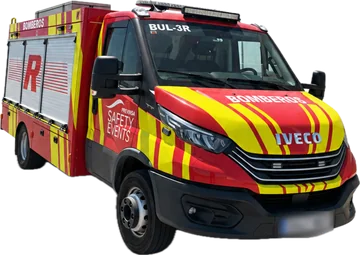
4821 KLMIveco Daily · BUL vehicle · Central station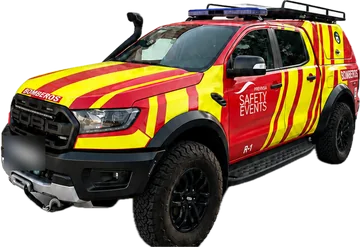
7350 HTRFord Ranger Raptor · Response pick-up · North Base
3317 GSVFord Tourneo · Support vehicle · Central stationThe outgoing shift records the status of the vehicle and the supplies; the incoming one sees it on arrival, with the open incidents and who reported them.
Equipment with periodic inspections, such as extinguishers or cylinders, carries its expiry date and its minimum, and the alert arrives before it runs out or expires.
ITV inspection, insurance and maintenance in a single record. Command and the workshop see the same thing and know what is due and when.
Check your shift and pending alerts from your phone or the station tablet.
Complete the checklist. If something fails, take a photo and maintenance is notified.
See what is missing or below the minimum before you need to use it.
The officer sees the state of the fleet and what was checked, when and by whom.
With Resoluvion we have greatly improved our procedures. Everything is clearer and better controlled, and it shows day to day.
Core modules come with the platform and optional ones are switched on when you need them.
Yes. Vehicles, supplies and staff are organised by location and the list can be filtered by base.
Yes. Start from templates by vehicle type or create your own from scratch, with the categories and mandatory photo you need.
With the optional HR module: rotation-based rosters, with holidays and absences in the same place.
Ready for what matters
We'll show you Resoluvion on your own operation: your vehicles, your checklists, your team. No commitment.